From Chaos to Click-Deploy: How to Fully Automate a Complex 3-Tier Windows Web Application on AWS
Automating a modern cloud-native application is usually straightforward—containerization, CI/CD pipelines, and IaC make it easy. But automating a legacy, monolithic 3-tier Windows application—written in .NET, hosted on IIS, dependent on Python and Java side-components, and requiring a labyrinth of configuration files—is an entirely different challenge.
This blog is the story of how I took a poorly architected, non-cloud-native enterprise product and turned it into a fully automated, zero-touch deployment on AWS. The final solution allowed us to provision infra + install the complete app stack—from scratch—in under an hour… fully automated with Terraform, Packer, PowerShell, and AWS-native services.
1. Application Overview: A Monolithic Product on the Cloud
The application was:
- Monolithic, but expected to run on AWS.
- Architected initially for on-premises IIS hosting.
- Dependent on:
- .NET (hosted on IIS)
- 2–3 Python components
- Java components
- ~7 modular supporting services
- Spread across 3 EC2 instances of various sizes.
- Required:
- MySQL RDS
- Redis (ElastiCache)
- Multiple configuration files
- Inter-instance communication
- Load balancers, WAF, Route53 routing
- Secrets Manager
- ACM certificates
This product had minimal documentation, no support for infrastructure automation, and no concept of cloud architecture (HA, scalability, secure config, etc.). But the business needed it on AWS—and they needed full automation.
2. AWS Architecture: Full Stack Infrastructure
At the infrastructure layer, we deployed:
Core AWS Services
- VPC with private subnets
- RDS MySQL
- ElastiCache Redis
- EC2 (3 instances) for hosting the front-end and backend components
- ALB with:
- Multiple target groups
- Components reachable on different ports
- Auto Scaling Groups (ASG)
- Launch templates for rolling updates
- Route 53 for internal DNS
- Secrets Manager for DB/Redis credentials
- ACM for certificates
- AWS WAF on the ALB
- S3 for file and image storage (the product generated a lot of images)
Constraints
- Not publicly exposed; only accessible within corporate networks.
- Multiple services shared the same EC2 (poor practice, but required).
- Each component ran on different ports.
- Components also communicated between EC2 instances.
This created an environment where automation was the only practical way to manage complexity.
3. Infrastructure as Code: Terraform Everywhere
The entire infra stack was built using:
- Terraform
- Terragrunt (wrapper for multi-account deployments)
For a deeper dive into how we leverage these tools for complex, multi-environment setups, you can read our detailed post on the ideal pattern for multi-environment cloud infrastructure using Terraform and Terragrunt.
Terraform handled:
- VPC
- RDS
- Redis
- ALB + target groups
- ASG & launch templates
- IAM roles + instance profiles
- Secrets
- S3 buckets
- Security groups
- Everything needed before the EC2s come online
Terraform dependencies were carefully designed so EC2s are created last, ensuring:
- RDS/Redis endpoints exist
- Secrets exist
- VPC networking is ready
- S3 and IAM permissions are available
4. Reverse Engineering the App
Since the product team did not provide an automated installer, we had to manually install the application in a dev environment, observe every step, and reverse-engineer:
- Required software
- Folder structures
- IIS website + app pool configurations
- Python/Java package dependencies
- Application execution model
- Hard-coded configuration files
- Security hardening requirements (IIS + OS)
- Inter-service dependencies
- All environment-specific values (DB endpoints, Redis, IP addresses, etc.)
This process created a detailed understanding of:
- What was static and could be baked into a golden AMI
- What was environment-specific and needed runtime configuration
5. Building Golden AMIs using Packer
To achieve repeatable installs, we created three custom AMIs (one for each EC2 role).
Using a Packer pipeline, each AMI included:
Base OS
- Hardened Windows Server 2019/2022
Installed Software
- Python
- Java
- Required Python packages
- .NET hosting bundles
- IIS installation
- IIS feature enablement
- Hardened IIS configuration
- Server Manager configurations
- Application code (from internal GitHub)
- Pre-exported IIS app configs (sites, app pools, bindings)
AWS CLI Installed
- Required for runtime fetching of secrets and endpoint values
App Code
We packaged the product team’s code into the AMI wherever it was environment-agnostic.
These AMIs were then replicated across Dev, Test, Prod AWS accounts.
6. Runtime Configuration via EC2 User Data
Once Terraform launched the EC2, user data executed a second automation phase using PowerShell.
This script:
Fetched Environment-Specific Values
Via AWS CLI:
- RDS endpoint
- Redis endpoint
- Secrets (DB username/password, API keys)
- IP addresses of peer EC2 instances
Generated Configuration Files
The app required many config files with dynamic values—so user data:
- Templates the files
- Injects environment values
- Writes them to the correct folders before the app starts
Warm-Up Timing
Some EC2s required 10–20 minutes to fully initialize IIS, app pools, and supporting services. We tuned launch templates so:
- EC2s warm up fully before ALB health checks begin
- ASG does not prematurely replace instances
- Dependencies between EC2s don’t break
This ensured stable boots with zero manual intervention.
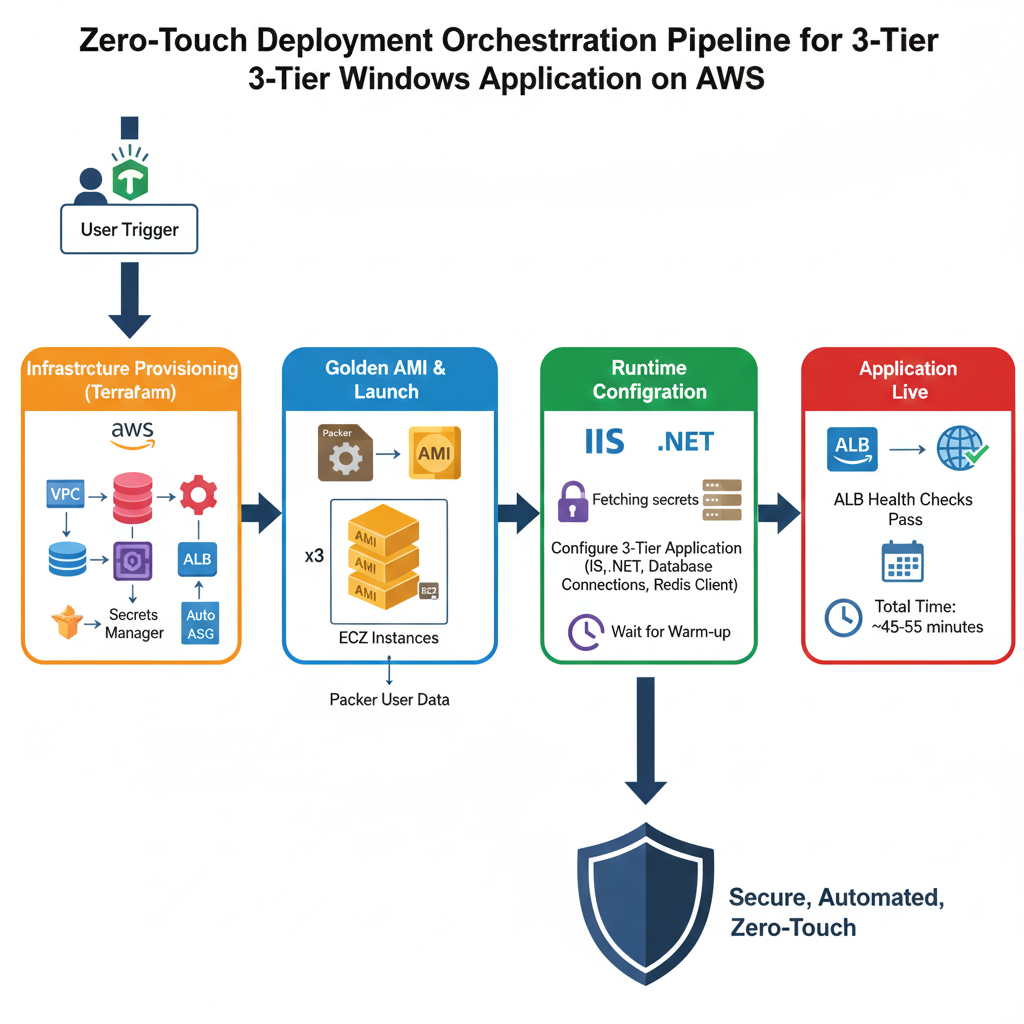
7. Orchestration & End-to-End Automation
The full orchestration looked like this:
- User triggers Terraform
- Terraform creates infra in dependency order
- VPC → RDS → Redis → Secrets → ALB → IAM → ASG
- ASG launches EC2 instances
- Using custom Packer AMIs
- EC2 user data runs PowerShell
- Installs dynamic config
- Pulls AWS secrets
- Generates runtime files
- ALB begins health checks
- App is live
Total time:
- Infra provisioning: 20–25 minutes
- EC2 warm-up + runtime config: 15–25 minutes
- Full stack live: ~45–55 minutes
This was a zero-touch, fully automated deployment.
The only manual item:
- Okta SSO configuration, which was a post-deployment step from the product team.
Everything else—infra, app install, config, hardening, wiring, and launch—was 100% automated.
8. Development-Time Challenges
1. No SSH on Windows
We initially couldn’t RDP (blocked by security), so we used:
- Port forwarding
- Systems Manager alternatives
- Later, restricted RDP access was approved
2. Multiple services on one EC2
Each component used different ports, so ALB target groups had:
- The same EC2 instance
- Multiple ports
- Multiple health checks
3. Inter-instance communication
We had to allow EC2-to-EC2 traffic securely and configure IP addresses dynamically.
4. IIS Configuration Automation
Some IIS components could be exported/imported; others required PowerShell-based creation during AMI building.
9. Final Outcome
The automation achieved:
- ✔ Fully automated infra provisioning
- ✔ Fully automated application installation
- ✔ Zero manual configuration across dev → test → prod
- ✔ Repeatable golden AMIs
- ✔ Runtime dynamic configuration with AWS CLI + PowerShell
- ✔ 100% push-button deployment
A previously manual, error-prone, multi-day installation turned into a single command deployment with:
- Predictable provisioning
- Full reproducibility
- No configuration drift
- Standardized environments
- Seamless upgrades through new AMIs + launch templates
Closing Thoughts
This project was a powerful example of how legacy monolithic applications can still be fully automated on cloud platforms—even when they lack cloud-friendly design.
By combining:
- Terraform
- Packer
- PowerShell
- AWS CLI
- IIS automation
- EC2 user data scripting
…we transformed a non-cloud-native enterprise product into a fully automated, zero-touch, cloud-hosted platform.
If you’re working with legacy Windows applications on AWS, automation is possible—you just need the right combination of tools, creativity, and reverse engineering.